the journal · buying guide
The 5 best paid video downloaders in 2026
Free downloaders are everywhere, and most of them cost you something anyway — in ads, bundled installers, accounts you did not ask for, or a nag screen on every launch. A paid downloader should simply work, look decent and leave you alone. We compared five paid video downloaders for Windows on what matters when you are about to hand over money: price, features, how you can pay, and how simple they are to live with.
Prices and features were checked against each vendor’s own pages in October 2026. Prices change and sales come and go, so check the vendor’s page before you buy.
At a glance
| # | Downloader | Lifetime price | Subscription | Platforms | Crypto |
|---|---|---|---|---|---|
| 1 | Axive | $4.99 (3 PCs) | none — there is none | Windows 10/11 | yes |
| 2 | 4K Video Downloader Plus | $25 (3 devices) · $45 Pro | $15/year (1 device) | Windows, macOS, Linux | not listed |
| 3 | VideoProc Converter AI | $54.95 (1 PC), sale price | $34.95 first year, then $39.95 | Windows, macOS | not listed |
| 4 | Allavsoft | $59.99 (1–3 PCs) | $19.99/month · $29.99/year | Windows, macOS | not listed |
| 5 | By Click Downloader | about $20, often on promotion | varies | Windows | not listed |
1. Axive — the best value, and the most beautiful
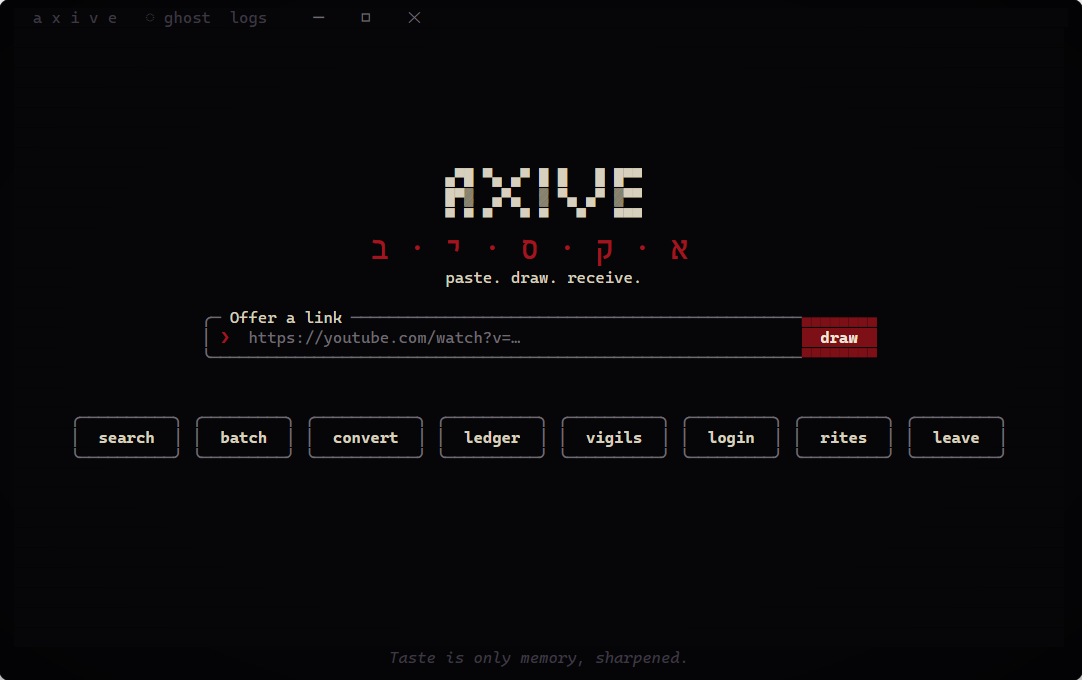
Axive costs $4.99, once. Not per month, not per year: once, for life, on up to three of your own PCs, with every 1.x update included. That is a fifth of the next cheapest lifetime licence on this list and roughly a tenth of the all-in-one suites — and it is the only one here that takes cryptocurrency at checkout.
It is also the simplest. There is one box. You paste a link and press draw; Axive shows every quality the video comes in with an honest size beside each one, checks that you have room on the drive, and gets out of the way. Paste several links at once and it becomes a batch. There is no account, no sign-in, no ads, no bundled offers and no telemetry.
And it looks like nothing else. Most downloaders look like a tax form. Axive opens in its own dark window with a crest that lights up as it starts, a line of old letters that slowly turns beneath it, and quiet lines of text that surface at the foot of the screen and sink again. Every action is a button you can click; every error is explained in one plain sentence with a fix beside it.
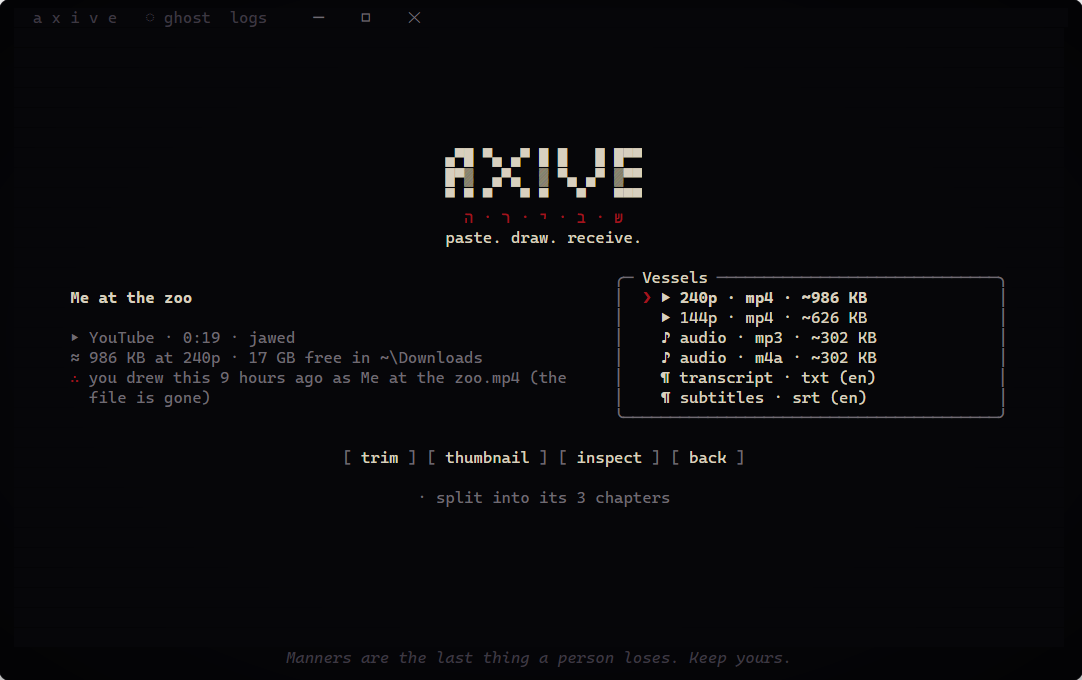
Under the surface it is far from basic. It downloads from YouTube, X, Instagram, TikTok, Reddit, Vimeo, Twitch, SoundCloud, Bilibili and more than 1,800 other sites, at up to 8K. Spotify tracks, albums and playlists come back as tagged MP3s without a Spotify account. Playlists and channels open as a list you tick; trimming keeps only the part you want, losslessly; SponsorBlock cuts out sponsors and intros; subtitles, chapters and thumbnails are sewn into the file. It keeps a searchable ledger of everything you have downloaded, watches channels for new uploads, resumes interrupted downloads after a restart, and repairs its own tools if anything is damaged.
- Price
- $4.99 once, lifetime, 3 PCs, all 1.x updates
- Pay with
- cryptocurrency at checkout; the key arrives the moment payment clears
- Platform
- Windows 10 and 11 (best in Windows Terminal)
- Refund
- 14 days
Pros
- by far the lowest price, and no subscription at all
- crypto accepted
- simple: one box, one button, plain-spoken errors
- a genuinely beautiful, distinctive interface
- no account, no ads, no telemetry
- deep features: 1,800+ sites, Spotify, trim, SponsorBlock, channel watching
Cons
- Windows only
- a terminal-style window — gorgeous, but not a conventional app
- no built-in web browser
Verdict: if you are on Windows, nothing else here comes close on value. It is the cheapest, the easiest to use and the nicest to look at, without giving up the features the expensive ones charge for.
2. 4K Video Downloader Plus — the polished cross-platform veteran
4K Video Downloader has been around for years and it shows in the polish. The Plus edition runs on Windows, macOS and Linux, downloads up to 8K when the source offers it, handles playlists and channels (including Watch Later and Liked videos when you sign in), saves subtitles in more than 50 languages, and has a Smart Mode that remembers your preferred format. Paid plans add a built-in browser, a proxy setting and automatic downloads from channels you follow.
It also has the only genuinely permanent free tier here, though the vendor does not publish its exact limits. Paid plans start at $15 a year for one device; lifetime licences cost $25 (Personal, three devices) or $45 (Pro, three devices, commercial use).
Pros
- mature and polished, on all three desktop systems
- reasonable lifetime prices
- Smart Mode, proxy, subscriptions to channels
- 14-day refund
Cons
- free-tier limits are not published
- the cheapest plan is a yearly subscription for one device
- no site count is given; coverage focuses on the big platforms
- download-only: little conversion
Verdict: the safest choice if you need macOS or Linux.
3. VideoProc Converter AI — a whole suite, priced like one
VideoProc is not really a downloader; it is a converter, editor, screen recorder and AI upscaler that happens to download too. The downloader claims 1,000+ mainstream sites, handles playlists and channels in batches and goes up to 8K; the rest of the suite converts between hundreds of formats with GPU acceleration and adds AI upscaling, frame interpolation and stabilisation.
That breadth is the appeal and the catch. If you only want downloads you are paying for a large install you will not use. At the time of writing a lifetime licence was on sale at $54.95 for one PC (list price $89.95); the yearly plan was $34.95 for the first year, renewing at $39.95. The free version is very limited: around ten sites, below 1080p, and five-minute files.
Pros
- downloader, converter, editor and AI tools in one licence
- broadest site claim among the big suites
- many payment methods, 30-day refund
Cons
- expensive if you only need downloads
- heavy on older PCs
- yearly plan renews higher than the first year
- very restricted free version
Verdict: worth it if you also edit and convert video; overkill if you don’t.
4. Allavsoft — the old all-rounder
Allavsoft downloads, converts and plays, and it schedules downloads for off-peak hours and can shut the PC down when it is done. It converts to a wide range of formats (MP4, MOV, ProRes, FLAC and more) and supports music services as well as video sites. It runs on a remarkably long list of Windows and macOS versions.
Its pricing has three tiers on Windows: $19.99 a month, $29.99 a year, or $59.99 for a lifetime licence covering one to three PCs, with a 30-day refund. The interface looks its age, and the vendor’s own pages disagree on how many sites it supports and on its maximum resolution, so try the trial on the sites you care about before paying.
Pros
- download, convert, schedule and play in one app
- very wide format and OS support
- 30-day refund
Cons
- dated interface
- inconsistent claims about sites and resolution
- the most expensive lifetime licence here
Verdict: capable, but you pay twelve times Axive’s price for an older experience.
5. By Click Downloader — one click, Windows only
By Click Downloader’s trick is detection: when you open a video in your browser it notices and offers to download it with one click. Premium unlocks whole playlists and channels, private videos, HD and higher, subtitles, MP3 tags and conversion to formats such as MP4, AVI, MKV, WAV and M4A. It is light and runs only on Windows, covering 40+ sites.
Its official premium page advertised the unlimited licence at $19.99 during our check, with frequent promotions; third-party reviews quote different figures, so confirm the price at checkout. The free version is limited and reportedly shows ads.
Pros
- genuinely one-click, with browser detection
- light on resources
- 30-day refund
Cons
- Windows only, about 40 sites
- price unclear and often on “sale”
- mixed reviews of support and reliability
Verdict: convenient for casual use, but narrow.
Feature matrix
| Feature | Axive | 4K VD Plus | VideoProc | Allavsoft | By Click |
|---|---|---|---|---|---|
| Lifetime price | $4.99 | $25–$45 | $54.95+ | $59.99 | ≈$20 |
| Crypto payment | yes | not listed | not listed | not listed | not listed |
| No account needed | yes | for most use | not stated | not stated | not stated |
| No ads, ever | yes | paid plans | paid plans | not stated | premium |
| Sites | 1,800+ | major platforms | 1,000+ claimed | 100–1,000 (claims vary) | 40+ |
| Up to 8K | yes | yes | yes | claims vary | claimed |
| Playlists & channels | yes, pick visually | yes | yes | playlists | premium |
| Spotify to MP3 | included | no | no | yes | no |
| Subtitles & transcripts | .srt and .txt | .srt | yes | yes | premium |
| Trim before or after | lossless | no | editor | no | MP3 cutting |
| SponsorBlock | yes | no | no | no | no |
| Watch channels for new uploads | yes | yes | no | no | no |
| Download history, by video ID | yes | list | no | no | no |
| Resume interrupted downloads | yes, even after a restart | not stated | yes | not stated | not stated |
| Converter | common formats | audio only | 420+ formats | many | some |
| Send links from your phone | QR code | no | no | no | no |
| Built-in browser | no | yes | no | no | detects your browser |
| macOS / Linux | no | both | macOS | macOS | no |
“Not listed” and “not stated” mean the vendor’s own pages did not say, when we checked in October 2026.
How to choose
- On Windows and want the best value? Axive: $4.99 once, simple, beautiful, and as capable as anything here for downloading.
- Want to pay with crypto? Axive is the only one on this list that takes it.
- Need macOS or Linux? 4K Video Downloader Plus.
- Also edit and convert a lot of video? VideoProc Converter AI.
- Want scheduling and a built-in player in an old-school app? Allavsoft.
Questions
Is a paid video downloader worth it?
If you download more than now and then, yes: you are paying to avoid ads, bundled installers and limits, and for software that keeps up when sites change. At $4.99 the question mostly answers itself.
Is downloading videos legal?
It depends on where you live and what you download. Downloading your own uploads, public-domain or Creative Commons material, or content the owner allows is generally fine; none of these tools should be used to break DRM, and none of them on this list claim to.
Which paid downloader takes crypto?
Of the five we compared, only Axive accepts cryptocurrency at checkout.
Written by the Axive team. We make Axive, so take our first place with that in mind — we have tried to describe the others fairly, from their own pages, as of 20 October 2026. Product names belong to their owners. Back to Axive.